For teams managing multiple WhatsApp, Telegram, and other social media accounts, the real challenge is not simply how many accounts have been connected.
The real challenge is being able to answer questions such as:
- How many new customers did we acquire today?
- Which accounts generated the most new leads?
- How many accounts are currently offline?
- Are duplicate or lost contacts increasing?
- Has message volume changed significantly over the past few days?
- Are there still large numbers of customer messages waiting for a response?
Previously, this information could be scattered across different pages, account lists, and pop-up windows. Managers had to switch repeatedly between different areas of the system to understand the overall operational situation.
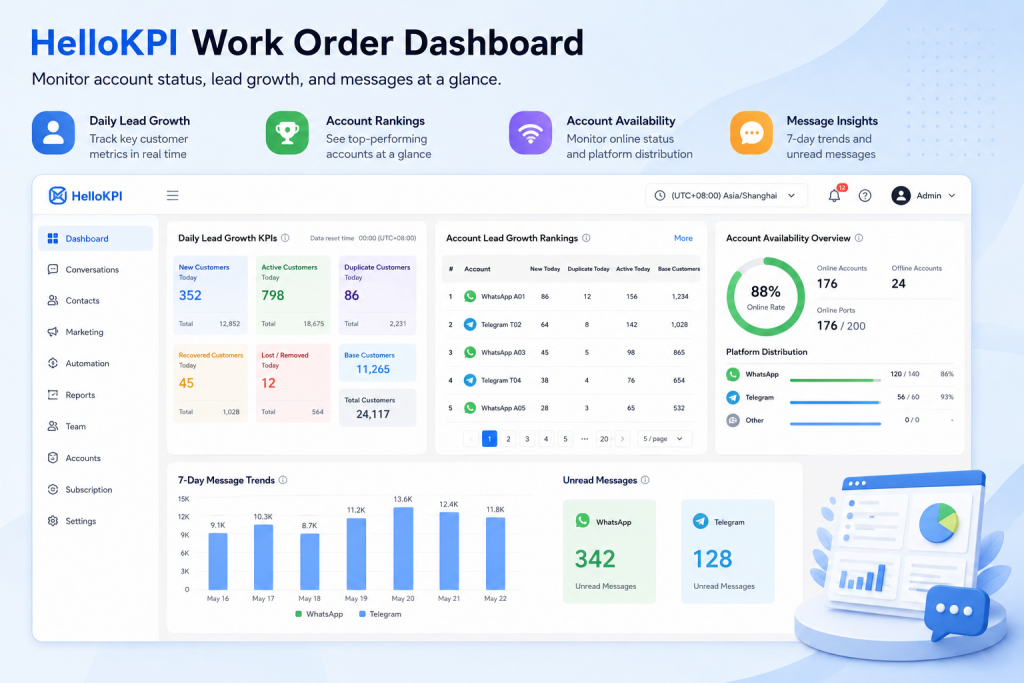
To address this problem, HelloKPI has redesigned its desktop home page and introduced a persistent Work Order Data Dashboard.
The updated home page is no longer just a collection of shortcuts. It now serves as an operational control center that teams can use as soon as they open HelloKPI.
Daily lead growth, account availability, account rankings, message trends, and unread conversations can now be reviewed from a single page.
From Viewing Data to Discovering Problems
Traditional reporting pages usually focus on displaying numbers.
In real cross-border operations, however, managers do not simply need more numbers. They need to identify problems quickly.
For example:
- Why did a particular account generate no new customers today?
- Why did a specific platform suddenly show a high number of offline accounts?
- Which accounts are attracting too many duplicate contacts?
- Message volume is increasing, but is the team responding quickly enough?
- Is the number of online ports approaching the current subscription limit?
The HelloKPI Work Order Dashboard is designed around these everyday management questions.
It brings together four major operational modules:
- Daily lead growth KPIs
- Account lead growth rankings
- Social account availability overview
- Seven-day message trends and unread message overview
Managers no longer need to open each account individually or manually assemble spreadsheets to understand what is happening across the team.
1. Daily Lead Growth KPIs: Start With What Happened Today
The first section on the HelloKPI home page is the daily lead growth KPI area.
This section displays daily and cumulative values together, including:
- New customers acquired today
- Active customers today
- Duplicate customers today
- Recovered or supplemented customers today
- Removed or lost customers today
- Base customer count
- Total customer count
For metrics that support both daily and cumulative values, the dashboard highlights the daily figure and displays the cumulative total underneath it.
This makes it easier to compare short-term changes with long-term customer growth.
The dashboard also shows the daily data reset time, helping teams understand exactly how “today” is calculated. This is particularly important for businesses working across time zones, overnight shifts, or international markets.
Why Compare Daily and Cumulative Data?
Cumulative customer totals alone can hide daily operational problems.
An account may have a large historical customer base while no longer generating meaningful new leads. On the other hand, a newly launched account may have a small cumulative total but a strong daily growth rate.
By comparing daily and cumulative values together, teams can determine:
- Whether established accounts are still growing steadily
- Whether new accounts have started generating customers
- Whether daily lead growth has dropped unexpectedly
- Whether duplicate or lost customers are increasing
- Whether recent marketing or operational activities are producing results
2. Account Lead Growth Rankings: Look Beyond the Team Total
Team-wide lead growth can show the overall result, but it does not explain where that result came from.
To make account-level performance more visible, HelloKPI has added an account lead growth ranking table directly to the home page.
The ranking currently displays:
- Basic account information
- Total and daily new customers
- Total and daily duplicate customers
- Total and daily active customers
- Base customer count
Accounts are ranked by the number of new customers acquired today, with the strongest-performing accounts displayed first.
The table also supports pagination and page-size adjustment, making it practical for teams managing large numbers of social media accounts.
Rankings Are Not Just for Competition
The purpose of the account ranking is not simply to compare which account has the highest number.
Its greater value is helping teams identify differences between accounts.
For example:
- One account may generate many new customers but also have a high duplicate rate.
- Another account may have a large historical customer base but show declining daily growth.
- Some accounts may generate no new leads for an extended period and require a review of account status, traffic sources, or operational strategy.
- An account with steadily increasing active customer numbers may be attracting higher-quality prospects.
When new, duplicate, active, and base customer data are shown together, teams can move beyond asking how many customers were acquired and start evaluating whether those customers are valuable.
3. Social Account Availability Overview: Identify Offline Accounts and Port Risks
For multi-account teams, account availability is one of the most fundamental operational indicators.
It is also one of the most frequently overlooked.
An account may have been logged in successfully, but once it becomes disconnected, invalid, or unavailable, several problems may occur:
- New messages may not be received promptly.
- Customers may wait too long for a reply.
- Operational tasks may fail to run.
- Broadcast or automated tasks may be interrupted.
- Agents may incorrectly assume that customers have not replied.
The new Work Order Dashboard includes a social account availability overview showing:
- Number of currently online accounts
- Number of currently offline accounts
- Overall account availability rate
- Number of online ports compared with total ports
- Account distribution across social platforms
- Online and total account counts for each platform
A circular progress indicator, account statistics, and platform availability bars make the overall account health status easy to understand.
When the availability rate of a particular platform drops suddenly, managers can identify the problem directly from the home page without waiting for an agent to report it.
The team can then investigate possible causes such as:
- Network problems
- Proxy failures
- Expired login sessions
- Platform restrictions
- Account security controls
- Device or session conflicts
For teams with very large account pools, the current platform distribution is calculated using a large account sample. When the result is approximate rather than complete, the interface displays a notice so that approximate statistics are not mistaken for exact totals.
4. Seven-Day Message Trends: Understand Whether Business Is Growing or Cooling Down
Single-day data can easily be affected by holidays, advertising schedules, campaign launches, and staffing arrangements.
For this reason, the HelloKPI Work Order Dashboard includes a seven-day message trend chart.
The chart displays daily message volume and currently combines WhatsApp and Telegram message counts.
This helps teams quickly observe:
- Whether message volume is rising or falling
- Whether a particular day produced an unusual spike
- Whether a new campaign generated additional customer conversations
- Whether customer activity differs between weekdays and weekends
- Whether the current number of agents can handle increasing message volume
The chart uses a lightweight native dashboard implementation, allowing managers to review recent business trends without opening a separate reporting system.
5. Unread Message Overview: Make Customer Waiting Visible
An increase in message volume does not necessarily mean that the team’s service capacity has increased at the same rate.
When multiple platforms and accounts are managed simultaneously, one of the most common problems is that messages are received but not handled promptly.
The redesigned home page places unread message totals next to the message trend chart.
The current implementation prioritizes platforms that already support local conversation unread statistics, especially WhatsApp and Telegram. The displayed platforms are also filtered according to the platforms enabled for the current agent.
When unread messages begin to accumulate on a particular platform, managers can take immediate action, such as:
- Reassigning agent responsibilities
- Checking whether accounts have gone offline
- Assigning more agents to high-volume platforms
- Identifying accounts with no active owner
- Prioritizing customers who have been waiting the longest
Customers do not become more patient simply because a business uses multiple systems.
In cross-border communication, customer patience is often measured in seconds.
Turning unread messages from hidden numbers inside separate platforms into a visible management indicator is an important step toward improving response efficiency.
6. Unified Data Definitions Across Account Information and Operational Performance
To maintain consistency across the dashboard, HelloKPI reuses and standardizes the original work order account detail logic.
Account data can include:
- Account avatar and platform icon
- Account nickname
- Account ID
- Phone number and country or region indicator
- Online or offline status
- New customer statistics
- Duplicate customer statistics
- Active customer statistics
- Base customer statistics
- Last online and offline time
- Account remarks
These fields are managed through a shared account detail column definition.
This allows the home-page ranking table and future detail views to use the same data structure and calculation rules, reducing the risk of different pages displaying inconsistent results.
7. Which Teams Can Benefit From the Work Order Dashboard?
Multi-Account Social Media Operations Teams
Teams managing large numbers of WhatsApp, Telegram, or other social accounts can quickly identify disconnected accounts and compare lead growth performance across the account pool.
Cross-Border E-Commerce and International Sales Teams
Teams can combine daily lead growth, active customer data, and unread messages to evaluate whether advertising campaigns, content strategies, and sales follow-ups are producing measurable results.
Customer Service and Sales Management Teams
Managers can immediately understand current messaging pressure and account availability without relying entirely on manual agent reports.
Account Operations and Risk Management Teams
Availability rates, offline account counts, and platform distribution can help teams discover account-pool problems earlier and reduce the risk of operational disruption caused by large-scale disconnections.
8. A Home Page Should Be an Operational Control Center, Not Just a Menu
Many software products use the home page as little more than a collection of menus and shortcuts.
For teams handling large volumes of customer conversations every day, however, the home page should answer more important questions:
- What happened today?
- Which accounts are performing best?
- Which accounts may have problems?
- Which platforms are accumulating unread messages?
- What should the team handle next?
This is the central idea behind the new HelloKPI Work Order Dashboard.
By bringing lead growth, account status, message trends, and unread messages together on the home page, HelloKPI is evolving from a multi-platform messaging aggregation tool into an enterprise SCRM workspace designed for team management and operational decision-making.
Conclusion
Connecting multiple social platforms is only the first step.
As the number of accounts, customers, and team members grows, businesses need a system that can continuously monitor account availability, customer growth, and message-handling efficiency.
The HelloKPI Work Order Dashboard brings previously scattered data into one place.
It makes hidden problems visible and helps managers identify operational risks earlier.
Because team efficiency is not determined only by how many accounts a business owns.
It depends on whether the business clearly understands:
Whether every account is online, whether every customer message has been handled, and whether every new customer is creating real value.