Turn Every Conversation Into a Manageable Business Opportunity — HelloKPI “Leads” Feature Explained
In the world of IM-based customer acquisition, opportunities often exist only in the few seconds after a message arrives. Respond too slowly, and the lead goes cold; respond poorly, and the data becomes fragmented. HelloKPI’s newly launched “Leads” feature is designed to turn those fleeting seconds into traceable, recordable, and manageable business opportunities.
1. Why We Built “Leads”
Teams doing overseas social media marketing and private traffic acquisition deal with hundreds or even thousands of strangers every day across WhatsApp and Telegram. It is normal for a single agent to monitor more than ten chat windows at the same time. But in this high-concurrency message flow, several long-standing problems become amplified:
First, response speed cannot keep up.
A customer sends “Are you there? Quote me a price” at midnight. By the time the agent sees it in the morning, the customer has already gone to a competitor. In IM marketing, the conversion window is extremely short—whoever responds first gains the advantage. In this field, response speed itself is a core competitive advantage.
Second, key information gets buried easily.
A high-value inquiry may be hidden among hundreds of group messages and dozens of private chats. Relying on manual scanning is exhausting and error-prone. The busier the agent becomes, the more high-intent customers get missed—an invisible but significant loss for most teams.
Third, conversation value cannot be retained.
Once a chat ends, it’s gone. How many valid inquiries were received today? Which customers showed interest but were not followed up? Everything depends on memory and subjective judgment. When managers want to review performance, there is no structured data available.
Previously, these problems were solved either by scaling manpower or relying on individual experience. With the “Leads” feature, we have built the full loop of “opportunity detection → instant response → structured logging” directly into the client as an out-of-the-box capability.
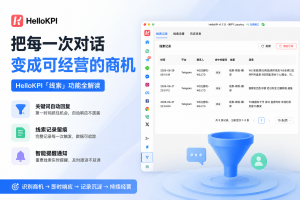
We deliberately did not call it “keyword replies” or “auto-response,” because its goal has never been just “replying.” It is about identifying valuable conversations as leads and continuously managing them as business opportunities. This is also why the product icon uses a funnel: the feature is essentially a business funnel that filters massive chat traffic into structured, actionable opportunities.
2. The Two Core Pillars of Leads
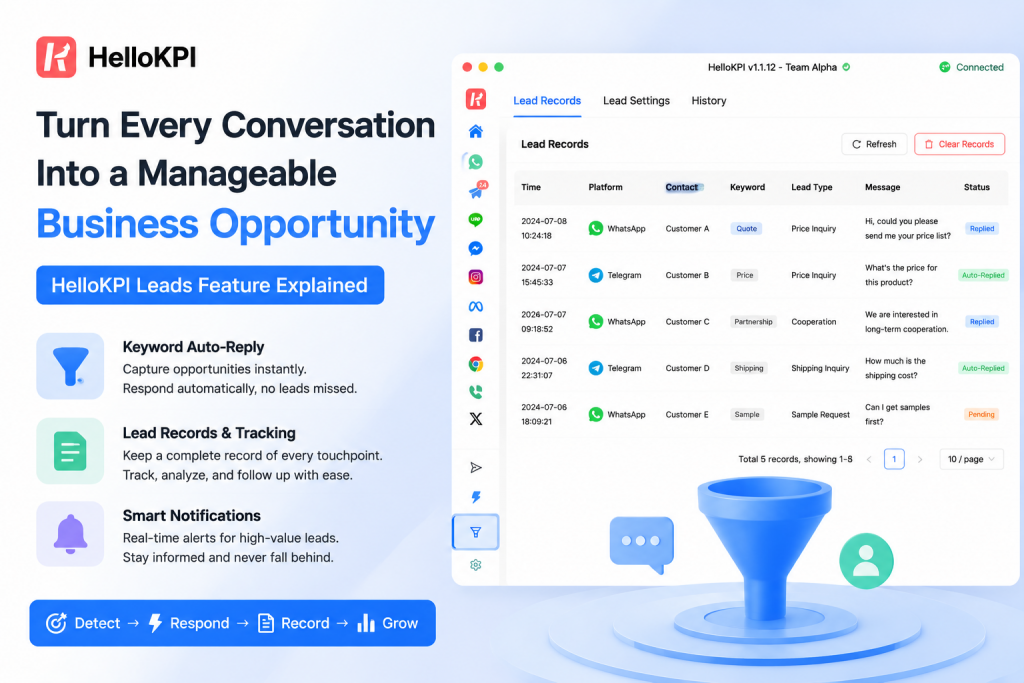
Open the “Leads” entry in the left toolbar of the desktop client, and you will see a clean interface. Behind it are two tightly connected capabilities: Keyword Auto-Reply and Lead Logging. They correspond to two stages of business handling: capture it, then record it.
Pillar 1: Keyword Auto-Reply — Capturing Opportunities Instantly
This is the “front line” of the Leads feature. Agents can pre-configure a set of lead rules, each containing keywords and a corresponding reply message. When WhatsApp or Telegram receives an incoming message that contains the configured keywords, the system reacts instantly.
For example, a cross-border e-commerce team might set “price,” “quote,” “how much,” and “quote” as a keyword group. From then on, whenever a customer mentions these words, the system can immediately identify and respond—even when the agent is away or overwhelmed by multiple chats.
A particularly important design detail:
Each rule has two independent switches — “Auto Reply” and “Notify.”
- autoReply: When enabled, the system automatically sends a predefined response, such as “Hi, please wait a moment while I check the price for you,” helping stabilize the customer and buy response time.
- notify: When enabled, a desktop notification pops up, alerting the agent that a lead has been triggered, ensuring immediate attention.
The key point is that these two switches are completely independent and freely combinable, enabling different business scenarios:
- Notify only, no auto-reply: Suitable for high-value leads requiring human-controlled messaging. The system only “watches,” while humans respond.
- Auto-reply only, no notify: Suitable for standardized FAQs. The bot handles it quietly without interrupting agents.
- Both enabled: A dual-protection mode that both stabilizes the customer and alerts the agent.
- Both disabled: Rules remain inactive but ready for activation during campaigns or promotions.
This “dual-switch” design reflects a core belief: automation should not be binary. Some messages should be handled by machines, others must be handled by humans. Decoupling “replying” and “notifying” allows teams to fine-tune their strategy per scenario.
To avoid auto-replies becoming spammy, we built an internal cooldown mechanism. The same conversation will not repeatedly trigger the same rule within a defined period, balancing responsiveness and user experience.
Another important detail for global teams: auto-reply messages are sent in their original text, without any secondary translation processing. What you write is exactly what the customer receives—critical for carefully crafted marketing scripts.
Pillar 2: Lead Logging — Never Losing a Single Opportunity
Capturing the moment is only the first step; recording it matters just as much. The default homepage of the Leads module is Lead Records.
Whenever a rule is triggered, the system automatically generates a record containing key information: which keyword was matched, which customer triggered it, the message content, and whether it was auto-replied or only notified. All records are sorted chronologically for easy review.
This changes everything:
“How many valid inquiries did we receive today?”
“Which keywords generate the most leads?”
“Which customers mentioned price but were not followed up?”
These questions, once based on guesswork, now have real structured data.
Over time, the value compounds. After one week, you can identify the best-performing keywords and optimize your messaging. After one month, you can measure real lead volume for performance evaluation. Over a longer period, these records become the team’s most valuable knowledge base—even if experienced agents leave, their insights remain in the system.
The interface separates “Lead Records” and “Lead Settings” into two tabs. By default, it opens on records, because reviewing activity is the most frequent behavior, while configuration is less frequent. Good product design puts the most common actions closest to the user.
Together, these two pillars form a complete business loop:
Auto-reply captures opportunities in real time, and lead logging ensures none are lost.
3. Engineering Considerations Behind the Experience
A good feature hides its complexity. During implementation, we solved several non-trivial engineering challenges:
Correctly identifying group chats.
A large portion of valuable leads come from group conversations. WhatsApp and Telegram have different chat models, and incorrect handling could misclassify group messages as private chats. We adapted both platforms separately to ensure accurate categorization.
Only processing incoming messages.
One common failure mode in automation systems is self-triggering loops. We strictly filter message direction so that only customer inbound messages can trigger rules. Agent messages are never processed.
Seat-level data isolation.
All rules and records are isolated per agent. Each agent manages their own leads without data leakage, ensuring privacy and clear operational boundaries.
Local-first and privacy-friendly design.
Rules and records are stored locally on the client, and matching is also performed locally. This ensures near-zero latency and stable performance even under network instability.
4. What It Brings to Your Team
For agents:
No more worrying about missing late-night inquiries. No more drowning in chat windows. The system helps you monitor and stabilize leads so you can focus on real conversations.
For team managers:
You finally get structured visibility into lead generation: which keywords work, how many valid inquiries come in daily, and which leads are not followed up.
For the organization:
Conversations are no longer disposable interactions—they become structured assets that continuously improve messaging, workflows, and conversion performance.
5. Closing Thoughts
The name “Leads” was carefully chosen. We avoided terms like “keywords” or “auto-reply” because they describe mechanisms, not outcomes. What we want to express is a new working model:
Turn every meaningful conversation into a lead, and turn every lead into a potential deal.
From instant automated response to structured logging, the “Leads” feature captures opportunities scattered across message streams and organizes them into a clear funnel. That is exactly what the funnel icon represents:
Opportunities have always been there—you just didn’t have the right tool to capture them.
Now you do.
Open the HelloKPI desktop client, find the funnel icon in the left toolbar, and start managing every lead that comes your way.