How to Enable Real-Time Translation in Telegram? 2 Ways to Chat Across Languages
Language barriers are one of the biggest challenges in international customer acquisition.
If you’re using Telegram to communicate with overseas customers, constantly switching between translation apps can slow down conversations and hurt conversion rates.
In this guide, we’ll cover two practical ways to translate Telegram messages:
- Telegram’s built-in translation feature
- HelloKPI’s automatic two-way translation with OCR image translation
By the end, you’ll know which option fits your workflow.
Why So Many Global Businesses Use Telegram
Telegram is a cloud-based messaging platform known for:
- Fast performance
- Cross-device synchronization
- Large group support
- Strong privacy features
That’s why many international sales and support teams rely on Telegram.
However, communication becomes difficult when customers speak Spanish, Arabic, Thai, Vietnamese, Russian, or other languages.
Every extra step in the translation process increases response time.
Method 1: Use Telegram’s Built-In Translation Feature
Telegram includes a native translation tool that works well for occasional use.
Setup Steps
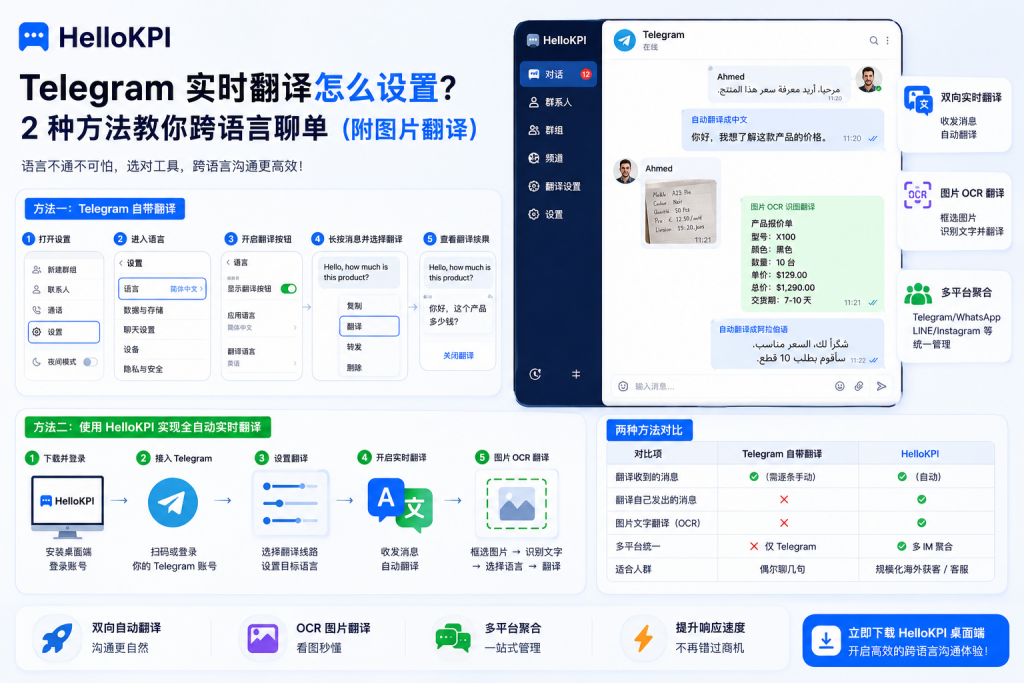
- Open Telegram Settings.
- Select Language.
- Enable "Show Translate Button".
- Open any conversation.
- Tap a message and choose Translate.
- Telegram will automatically translate the message into your app language.
Limitations
While convenient, Telegram’s built-in translation has several drawbacks:
- Messages must be translated manually one by one.
- Outgoing messages are not translated automatically.
- No support for image text translation.
- No cross-platform workflow.
For occasional conversations, it’s sufficient.
For large-scale customer acquisition, it quickly becomes inefficient.
Method 2: Use HelloKPI for Automatic Translation
HelloKPI Desktop integrates Telegram, WhatsApp, LINE, Instagram, Messenger, and other messaging platforms into a single workspace.
Its built-in translation system is designed for international sales and support teams.
Advantages Over Telegram Translation
Automatic Two-Way Translation
Incoming messages are translated into your language.
Outgoing messages are automatically translated into the customer’s language.
No manual clicks required.
Custom Target Languages
Select any supported language and communicate naturally with customers worldwide.
OCR Image Translation
Customers often send:
- Product screenshots
- Price lists
- Handwritten orders
- Payment receipts
HelloKPI allows you to:
Select Image → OCR Recognition → Translate
directly inside the conversation window.
This capability is not available in Telegram’s native translation feature.
Multi-Platform Workspace
Manage Telegram, WhatsApp, LINE, Instagram, and Messenger from one dashboard.
Translation settings work across all connected platforms.
Flexible Translation Routing
Configure translation providers once and use them across text and image translation workflows.
How to Use HelloKPI Translation
Step 1
Install HelloKPI Desktop and sign in.
Step 2
Connect your Telegram account.
Step 3
Open Translation Settings.
Choose your preferred translation provider and target language.
Step 4
Enable Real-Time Translation.
Incoming and outgoing messages will be translated automatically.
Step 5
For image translation:
Select Image → OCR → Choose Language → Translate
within seconds.
Telegram Translation vs HelloKPI
| Feature | Telegram Built-In | HelloKPI |
|---|---|---|
| Translate Incoming Messages | Manual | Automatic |
| Translate Outgoing Messages | No | Yes |
| OCR Image Translation | No | Yes |
| Multi-Platform Support | Telegram Only | Multiple Platforms |
| Best For | Casual Use | Sales & Support Teams |
Which Option Should You Choose?
If you occasionally chat with overseas contacts, Telegram’s free translation feature is usually enough.
If your business relies on international sales, customer service, or lead generation, HelloKPI offers a more complete solution:
- Automatic two-way translation
- OCR image translation
- Unified multi-platform messaging
- Faster response times
Language should never be the reason a customer stops replying.
Choose the right translation workflow and communicate globally with confidence.
👉 Try HelloKPI Desktop today and experience real-time multilingual communication across Telegram and beyond.