Too Long? Read This First
- WhatsApp bans usually happen due to spam, using unofficial apps, or being reported too often.
- To unblock your account, request a review from WhatsApp and wait for the result. If approved, verify your number to restore access.
- To avoid bans, use WhatsApp responsibly: only message people you know, ask before adding someone to a group, and avoid forwarding the same message repeatedly.
- Protect your privacy by reviewing who can see your profile photo, last seen, and online status. Block or mute unwanted contacts.
- Businesses should use official tools like the WhatsApp Business API through authorized providers such as Wati to stay compliant and secure.
Why Is Your WhatsApp Account Blocked?
Most bans occur when an account violates WhatsApp’s Terms of Service. Understanding the reasons helps you unblock your account and prevent future issues.
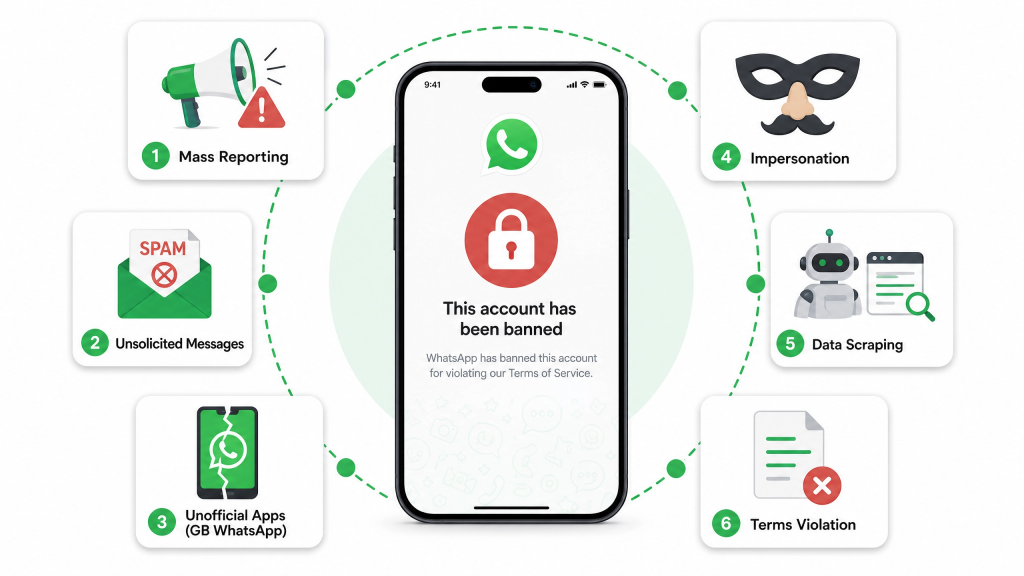
Common reasons include:
- Reported or blocked by many users – Repeated complaints can lead to a temporary or permanent ban.
- Sending unsolicited messages – Messaging too many people who haven’t saved your number, or forwarding the same message frequently, may be seen as spam.
- Using unofficial or modified apps – Third-party apps like GB WhatsApp, FM WhatsApp, or WhatsApp Plus are not approved by Meta and can lead to a ban.
- Impersonating someone else – Pretending to be another person, brand, or organization violates WhatsApp’s policies.
- Scraping user data – Using automated tools to collect user information without consent can result in a permanent ban.
- Violating Terms of Service – Sharing illegal, abusive, hateful, or misleading content, or running scams, can get your account blocked without warning.
How to Unblock WhatsApp Account
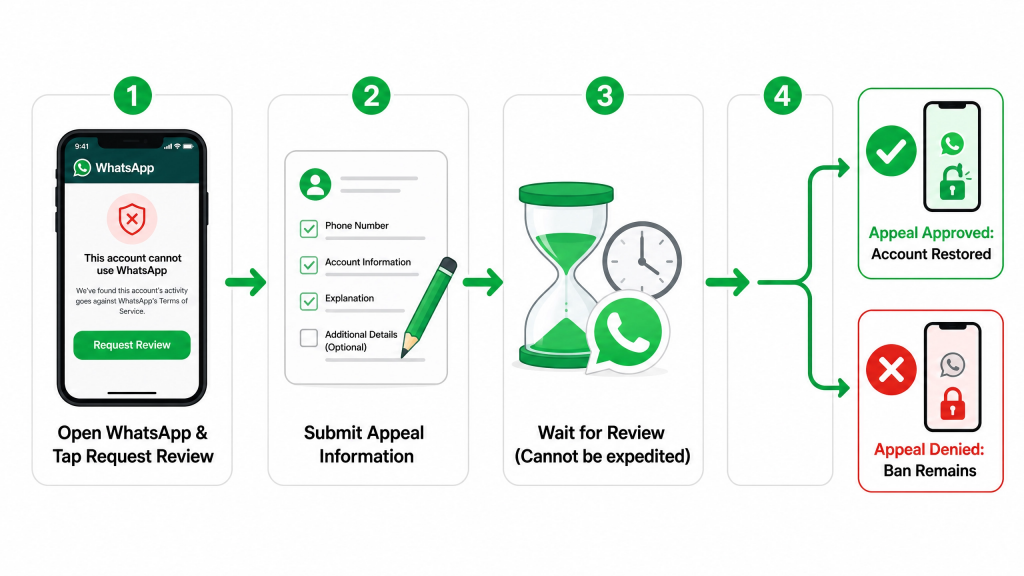
If you see “This account can no longer use WhatsApp,” follow these steps:
- Tap Request a review on the ban screen.
- Follow the on-screen instructions to submit your appeal.
- Wait for WhatsApp to complete the review. You cannot speed up the process.
- You will receive a notification with the final decision.
- If approved, your account will be restored. Verify your number to continue.
- If not, the ban remains.
- For business accounts, the process is the same, but it’s best to use the official WhatsApp Business API through a trusted provider.
How to Use WhatsApp Responsibly
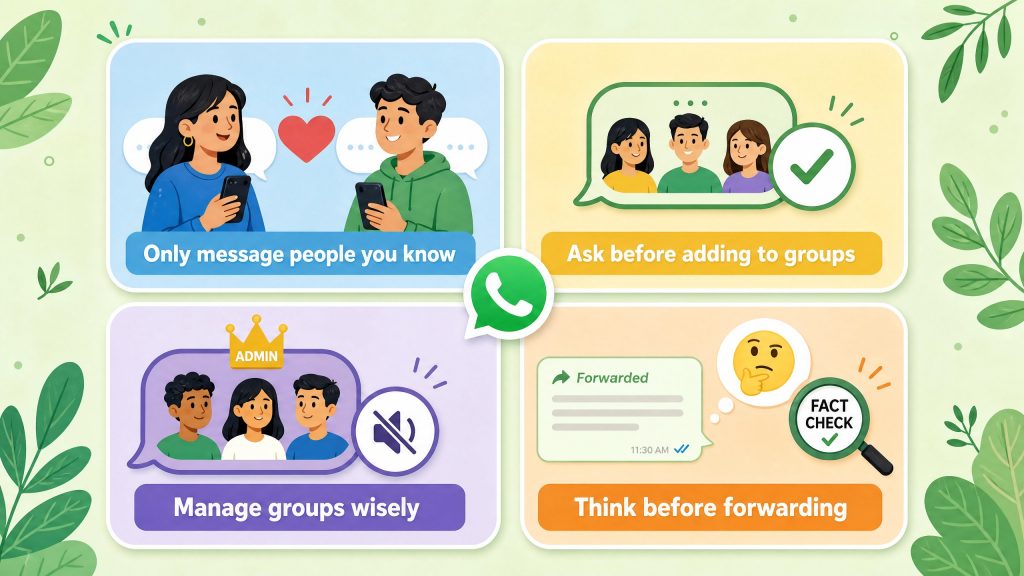
- Only talk to people you know – Message those who have reached out to you first or agreed to be contacted.
- Ask before adding to groups – Always get consent before adding someone to a group. If they leave, don’t re-add them.
- Manage groups wisely – Admins can set groups to “only admins can send messages” to reduce spam.
- Think before forwarding – Forwarded messages are labeled, and WhatsApp limits how many you can send. Don’t forward unverified content.
How to Stay Safe on WhatsApp
- Think before you share – Once sent, others can save or forward your messages.
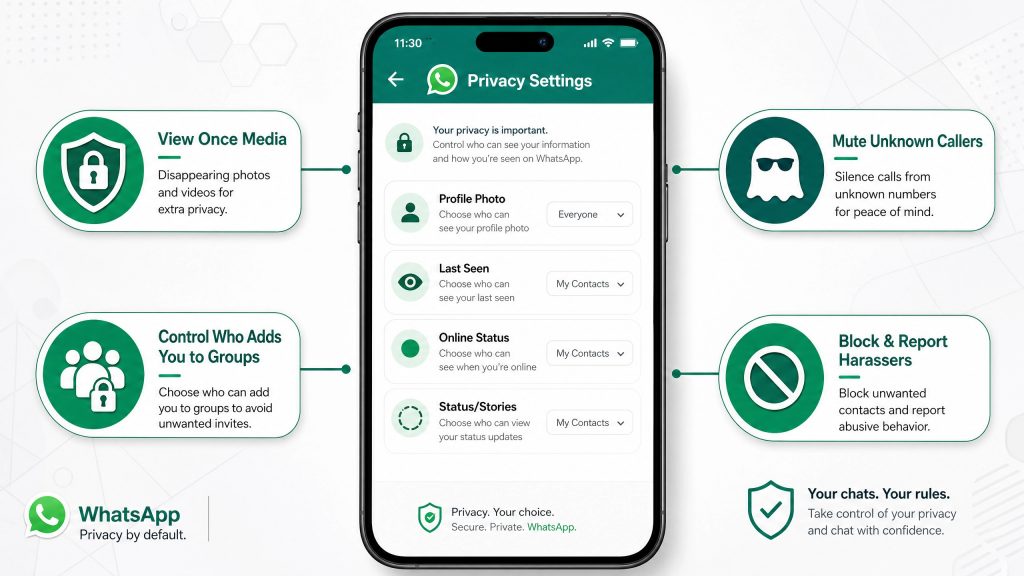
- Use View Once – For private photos or videos that disappear after viewing.
- Check your privacy settings – Go to Settings > Privacy to control who sees your profile photo, last seen, online status, and status updates. Options include: Everyone, My Contacts, My Contacts Except…, or Nobody.
- Block or report problematic contacts – Do this directly from the chat.
What to Do If Your WhatsApp Account Is Permanently Banned
- Find out why – Check the message shown when you open WhatsApp.
- Review WhatsApp’s Terms of Service – Understand what may have caused the ban.
- Appeal or start fresh – Tap “Request a review” to appeal. If that fails, register a new account with a different phone number. Businesses should use the official API.
How to Recover Data from a Blocked WhatsApp Account
- If you have backups:
- Android: Backup to Google Drive
- iPhone: Backup to iCloud
- To restore:
- Reinstall WhatsApp
- Sign in with the same number and cloud account
- Tap “Restore” when prompted
- No backup? – Chats cannot be recovered due to end-to-end encryption.
Closing Thoughts
Check your privacy settings, follow WhatsApp’s rules, and back up your chats regularly. For business users, an official provider like Wati helps you stay compliant and manage conversations across WhatsApp and Instagram.
Contact customer service for a free trial.@HelloKPI00,@HelloKPI01,@HelloKPI02